 Snipe
Snipe
OBS Studio for Twitch
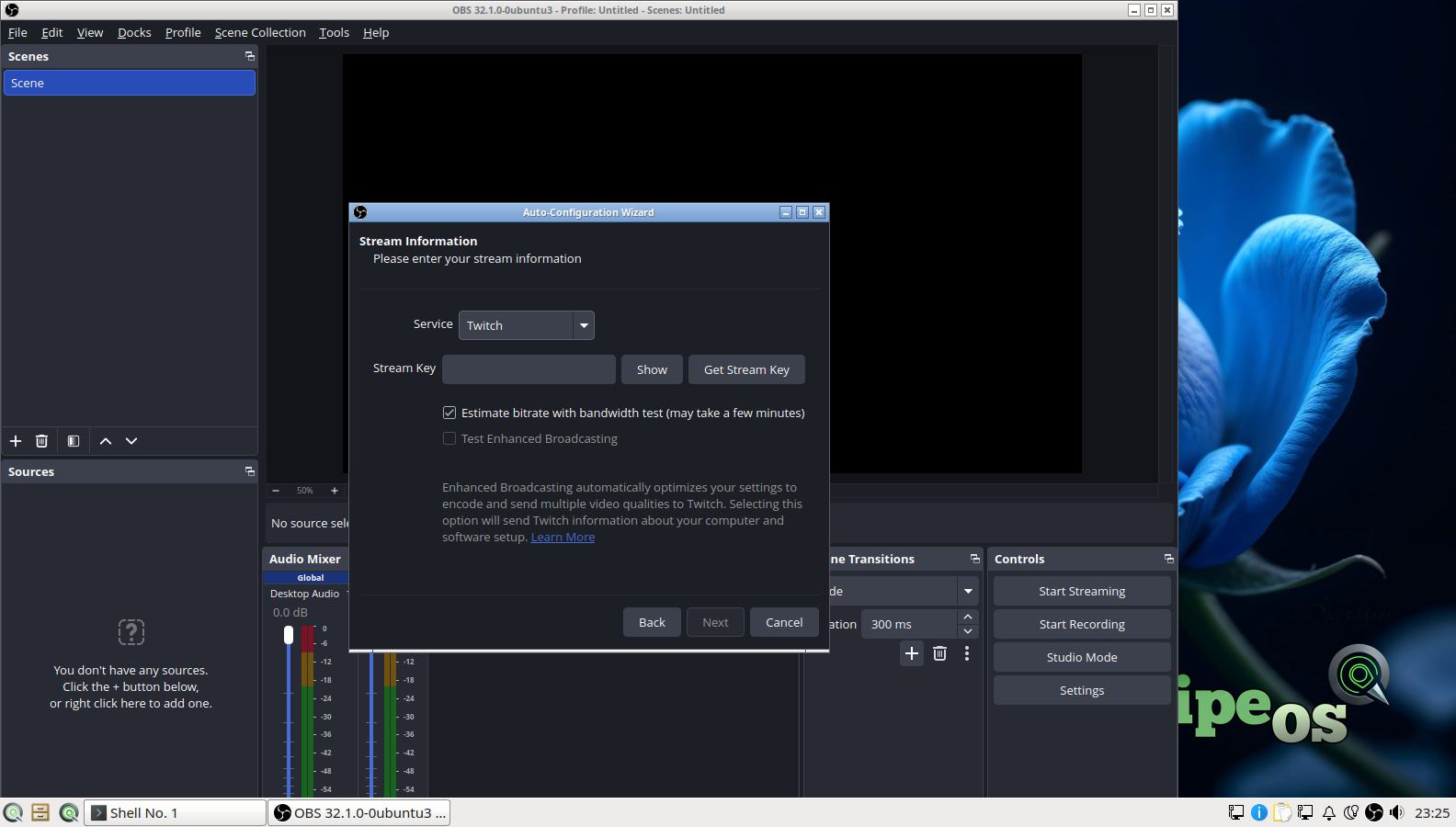
Scenes, sources, audio filters, and RTMP to Twitch. Autoconfig is validated on a fresh install, including the Twitch stream-info step, so first go-live is honest about what the machine can sustain.

SnipeOS
For Twitch streamers
A light Linux desktop that ships OBS ready for Twitch, a Steam path that survives dependency hell, and memory reclaim so closing a launcher actually gives frames back to the game.
Warning: This page is for SnipeOS 26. If you are using SnipeOS 13D, please click here.
SnipeOS is a creator-focused Linux desktop on Lubuntu 26.04 LTS. For streamers that means OBS, Steam, Wine, overlay tools, and a browser that does not chew through the same RAM you need for the encode.
A stream night stacks heavy processes on purpose: game or capture, OBS, chat in the browser, maybe Discord or alerts through Wine, maybe a music bed. On systems that reclaim memory lazily, every closed launcher leaves residue. By hour three you are dropping frames for no good reason. SnipeOS reclaims resources when you close an app, and Snipe flagship tools do not leave background helpers resident. Headroom you free is headroom the encoder can use.
Steam and Wine carry the dependency fixes that usually eat an evening on other Linux installs. OBS’s Twitch autoconfig path is part of the validated success gallery. Support tracks Lubuntu 26.04 LTS through April 2029. No forced cloud account, no telemetry in the Snipe flagships.
The stack you actually run when the stream is live and when you cut VODs afterward.
Scenes, sources, audio filters, and RTMP to Twitch. Autoconfig is validated on a fresh install, including the Twitch stream-info step, so first go-live is honest about what the machine can sustain.

i386, steam-libs, and Mesa Vulkan drivers are seeded so the one-click Steam path reaches login instead of unmet dependencies. Proton opens a large Windows catalogue for the games you stream.
Close a launcher, a browser profile, or a tool you only needed for setup, and SnipeOS reclaims the memory instead of leaving residue. On a stream box that is fewer surprise freezes and more stable encode headroom.
wineserver on PATH, quiet first run, Winetricks ready. Run the Windows-only alert apps, tools, or launchers that still refuse a native Linux build without standing up a full Windows VM.
Streaming with x264 is CPU-hungry. Background telemetry, AI assistants, and cloud sync helpers burn the same cores you need for the game and the encode. SnipeOS leaves those channels off by design.
Snipe Browser stays light for the Twitch dashboard and chat. Close what you do not need and the RAM comes back for the scene that is live. Cut VODs afterward in Kdenlive or Shotcut when the night is over.
The tier where OBS streaming, a game or capture source, and a browser for chat become practical. An SSD matters for load times and recording.
| Item | Requirement |
|---|---|
| RAM | 4 GB or more (8 GB preferred once the game is heavy) |
| CPU | 4 cores recommended for OBS streaming with software encode |
| Storage | SSD strongly recommended |
| Disk space | 20 GB+ free beyond the ~8 GB install for games, VODs, and temp files |
| Graphics | Integrated OK for light titles; discrete GPU nicer for modern games and hardware encode |
| Architecture | amd64 |
Local recording at modest settings can run further down the range; the OBS wizard will say so. Power-user libraries prefer 8 GB and a 256 GB drive. See the full hardware tiers.
Stream machines hold unlisted VODs, private Discord traffic, and unfinished overlays. SnipeOS leaves the usual desktop traps off by design.
Other operating systems ship assistants and screen-capture features that can read what is on your display, in your documents, and on your clipboard. The Windows Copilot / Recall class of tools is built to process what you are looking at, and product terms often put that material in scope for model training.
For a streamer that can mean unlisted VODs, donor messages, and off-stream Discord becoming someone else’s training data. SnipeOS has no integrated AI assistant, no recall-style capture layer, and no training pipeline.
Many desktops turn on cloud sync by default. Documents and Downloads quietly copy to a vendor so files appear everywhere. For streamers that often means multi-gigabyte recordings and private clips leaving the machine without a deliberate upload.
SnipeOS has no default sync service. Recordings stay local until you choose where they go: an external drive, YouTube, or Twitch itself.
Telemetry is not only a privacy issue. Background reporters and “improve the product” services burn CPU and disk on the same machine you need for the game and OBS. Mid-stream hitching is often junk you never asked to run.
Snipe flagship apps do not open that channel. Close a tool after setup and the memory comes back for the scene that is live.
Get the ISO, write it with Rufus, try the live desktop, then install when you are ready.
SnipeOS is not affiliated with Twitch Interactive, Inc. Twitch is a trademark of its owner.